WL4Editor User Helpfile
Part 1: About ROM and Level Loading
There are 3 official Wario Land 4 ROM, English version, Japanese version and Chinese version. In this period, we only support editing English version of WL4 ROM, the editor will check the ROM header to see if your ROM is an English version, loading any other file is not permitted. If you are using a ROM with other language translated by some other 3rd-party team, then if the resourxe ROM they used is an English version, you perhaps will be able to make levels using this editor, but the functionailty to change the levels’ names won’t be able to work correctly for sure.
You can select which Level to load by using the Button “Load Level”, and switch to different Room in the current Level by using the Buttons “<” and “>”.
Part 2: About editing mode
After you opening the ROM in the editor and it renders out the first Room from level Hall of Hieroglyphs, you can find a Dockwindow on the right side of the Mainwindow named Visibility and Editing Controls. you can choosean edit mode in Mainwindow here, the default mode is Layer means Layers editing.
MAP
In Layer mode, Tile16 Selector Dockwindow shows up, you can click and select Tile16 from the GraphicView and click to put the selected Tile16 into different Layers in the current Room. Always make sure which layer you are editing on, you can know it by have a look at which Layer you have selected in Visibility and Editing Controls Dockwindow. Remember that you cannot put Tile16 onto Layer 3, it is for background layer only, the Layer 3 always uses Tile8x8 but not Tile16 for mapping. Same things happen in several Layer 0 in Toxic Landfill too. We just have not supported editing those Layers yet.(you can check mapping type details in Room Config Dialog)
There are up to 4 Layers totally in one Room numbered from 0 to 3, not all of them will be used in the Room. If the CheckBox of a Layer is disabled, then it is unused in this Room and you cannot select and edit it. you can enable/disable Layer 0, 2 and 3(Background Layer) by changing configuration in Room Config Dialog(menu -> Edit -> Room Config). You always need at least one Layer(Layer 1) to put MAP16 in a Room.
Layers can have different priority orders in different Rooms and Levels, you can find the priority setting in Room Config Dialog. Priority also affect the graphic effect when you apply color composition to them. The Game engine let the Layer 0 be able to color-composite to the Layer(s) under it, it is called color(alpha) blending of the Layer 0. You can open Room Config Dialog, enable/disable Layer 0 color blending and pick a blending params solution to configure the color blending effect. it use this calculation to blend color for all the three color channels(Red, Green and Blue):final_color = Layer0_color x param_1 + underlying_graphic_color x param_2
It is color blending which let Rooms have semi-transparent water and stream, and different light and shadow areas under electric lamps, etc. Use color blending flexibly can make better and inspiring Levels. To have a look at the original Layer 0 without color blending, unselect CheckBox “A”(Alpha) in Visibility and Editing Controls Dockwindow.
Door
All the rectangles in Rooms causing Wario warp or indirectly warp to a different place are called Doors. So it is obvious that Doors have different types: vortex and real door and instant warp, etc. Even until now, we don’t know how some of the Doors work, you can only find 5 Door types in the Door Config Dialog(double click on a Door to open in the latest build) does not means there are only 5 types in the game. You can switch to Door editing mode by selecting “Door” RadioButtom in Visibility and Editing Controls Dockwindow.
the Blue rectangles rendered in the Room show the size and the place of all the Doors in the current Room. you can select Door in Door editing mode, click the selected Door again to open Door Config Dialog. most of the things in this dialog is self-evident, only some of them need an explanation.
The BGM is saved and ordered using a global Id, go out from a Door can reset the BGM if you set a new id for the current Door. then the BGM will be changed, if you set it to 0, it will continually play the previous BGM. You always need a non-zero value for the vortex Door
Also EntitySet is saved in Door data. There is a Room in Arabic Night, you go into a pipe and the Enimies in the Room change to bees/bats. it is an evidence that EntitySet configuration param is saved in Door data. The whole thing is complicated. Every Room has 3 Entity lists(only include local Entity id numbers) which save the locations and local Entity Id in the current Entity set(or called sprites set). appearing in 3 different difficulties. The game engine cannot load all the graphics for all the Entities in the game like modern game into the RAM so every time it always need to load a part of them.(indeed modern games don’t load everything into the RAM too, they can load them dynamically or use some other strategies) Each part are made into a set called EntitySet. Every Door can have its own EntitySet Id flag to let the Room show up different Enimies. So you should pick up a proper EntitySet for each Door.
According to the hacking and the ROM data, we temporarily let you use five types of Doors. the first for vortex only, the second is Room Edge(for instant warp), then Door or Pipe, Items shop, Boss door. the classification method is good in most of the cases. but we still don’t know how to deal with some exceptions in some of the Level. In Level Toy Block Tower, a lot of Doors are type 1, we don’t know why they are different though. So pick up a Door sensibly when you are editing them.
Part 3: Details in the Editor
Tile16 Selector and Tile Information in Tile16 Selector
All the Tile16s are made of Tile8x8s, there are hints about how many Tile8x8s need to be loaded for each Tileset in the ROM, but no hint shows how many Tile16 we should generate( the data used to generate Tile16s are saved in one-dimensional array, but there is no hint shows the end of the array). So we just try to generate Tile16s as much as possible, you can always find garbage Tile16s on the tail of the whole Tile16s map.
Otherwise, you can also find an Event ID and a Terrain type ID for each Tile16. The Event ID always triggers some code in the game engine when Wario knocks into the Tile16. Breaking a block, getting a ruby, going into a Pipe, etc. all of these things need different code to deal with in the game engine when the game is running. Different Event ID triggers some different code in the game engine at the right time. The Terrain type ID does the similar things, when you control Wario to do different actions(You press different keys to control Wario) on some Tile16(s) or near them, different code will run in the game engine to control Wario’s states and animations. You will find all the solid Tile16s all use 0x01 as their Terrain type ID. According to these two params, you can know how those unused Tile16s will react to Wario’s different actions now. Here is an example: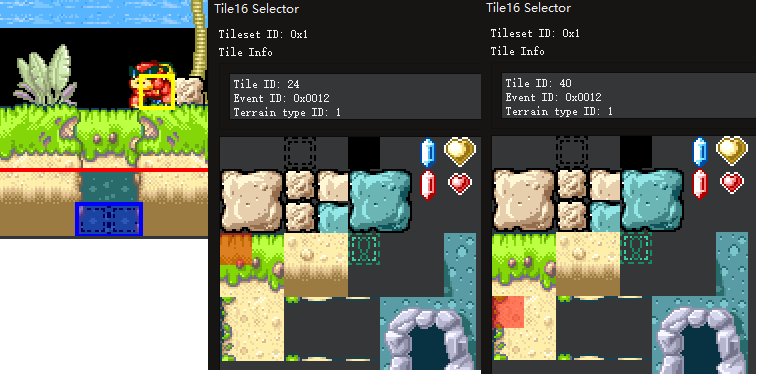
You may know the place in the first graphic, you can let Wario ground-pound here and warp into another Room. We find the Tile16 in the Tile16 Selector by a right click on the Tile16 in the correct Layer, and find its Event ID is 0x0012. Perhaps you will find another unused Tile16, it has the same Event ID in the third part of the graphic. Then we can know that, if Wario attact it with a B(or R) dash, those Tile16s will disappear with leaves scattered around. We can put these unused Tile16s here to make this hidden Room enterable. but don’t forget to replace the Tile16s for the whole wall there, because the original wall uses a different graphic pattern.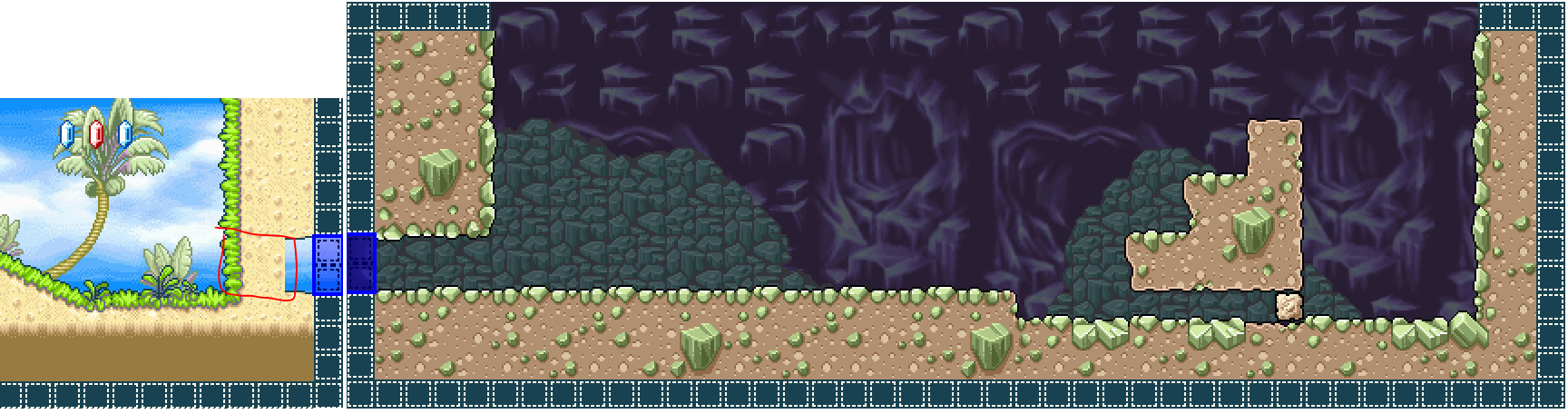
These 2 params can be edited in Tileset Editor now.
Alpha Blend Attributes
There’s unfortunately no great ways to describe alpha blending, we could be hand-wavey and say it’s a transparency value, but alpha blending and transparency are not the same thing.
Transparency color calculations are a subset of alpha blending. So if you have transparency, you will have a top color with some opacity level EVA, and a bottom color which is EVB = 1 - EVA.
So green with 30% opacity on top of red would be some color that is 0.3 * red + 0.7 * green, don’t forget the R, G, B tunnels are calculated seperately. However, with alpha blending, the relation does not hold true, it means that colors can additively go over 255 (they cap at 255) and EVB + EVA not always equals to 1, it can be bigger than 1. So something like 0.7 * yellow + 0.6 * green will give you 1.3 times the green channel, making any pixels with 196 or more green max out at 255.
But anyway, we call it the alpha blending attribute because WL4 has a few sets of EVA/EVB pairs that you can pick from (you can’t set them individually), which can be set in Room Config Dialog.